UI Refinement
Eye Tracking Analysis
Semi Structured Interviews
Task Efficiency
Hogrefe Usability Testing
A strategic usability investigation of the Hogrefe Diagnostic Toolbox focused on clearing severe navigation barriers. By translating eye tracking data into actionable insights, this research delivers targeted UX solutions that improve feature discoverability and align the software with natural clinical workflows.
Year :
2024
Industry :
HealthTech and Diagnostics
Role :
Lead UX Researcher
Project Duration :
4 months
↑0%
↑0%
Redesigning the core navigation menu with highly descriptive labels is expected to improve feature findability by 70% and completely eliminate repetitive user misclicks.
Redesigning the core navigation menu with highly descriptive labels is expected to improve feature findability by 70% and completely eliminate repetitive user misclicks.
Redesigning the core navigation menu with highly descriptive labels is expected to improve feature findability by 70% and completely eliminate repetitive user misclicks.
↓0%
↓0%
Clarifying complex domain jargon and refining input fields is projected to reduce overall cognitive load by 40% allowing professional users to easily process clinical data without unnecessary mental fatigue.
Clarifying complex domain jargon and refining input fields is projected to reduce overall cognitive load by 40% allowing professional users to easily process clinical data without unnecessary mental fatigue.
Clarifying complex domain jargon and refining input fields is projected to reduce overall cognitive load by 40% allowing professional users to easily process clinical data without unnecessary mental fatigue.
↑0%
↑0%
Streamlining the primary entry points is projected to drive an 80% increase in task efficiency successfully closing the massive completion time gap between clinical tasks.
Streamlining the primary entry points is projected to drive an 80% increase in task efficiency successfully closing the massive completion time gap between clinical tasks.
Streamlining the primary entry points is projected to drive an 80% increase in task efficiency successfully closing the massive completion time gap between clinical tasks.
My role :
I led the complete usability research lifecycle for this project. My responsibilities ranged from designing the test protocol and setting up the Tobii Pro eye tracking system to moderating the live sessions and taking detailed behavioral notes. I then synthesized these raw observations using affinity mapping and applied Likert scale ratings to clearly quantify user task difficulty.
CONTEXT :
The primary goal of this research was to evaluate the usability of the Hogrefe Diagnostic Toolbox website. By delivering actionable insights to refine the UI the objective was to significantly improve overall user satisfaction and daily task efficiency for clinical professionals.
THE CORE CHALLENGE :
Users of the diagnostic platform faced significant friction due to terminology overload, difficult feature discovery and missing input validation. The primary goal of this research was to evaluate the website and deliver actionable insights to refine the interface. By addressing these specific barriers the objective was to vastly improve overall user satisfaction and daily task efficiency.
Methods :
• Semi-Structured Interviews
• Think-Aloud Technique
• Eye-Tracking (Tobii Pro)
• Observation & Video Recording
The Testing Scenarios :
To ensure our findings were grounded in real world applications I structured the eye tracking observation around two highly critical clinical workflows.
Task 01 :
Task 01 :
Users were asked to imagine they just conducted a psychological assessment and needed to locate and use the feature for converting standard test scores.
Users were asked to imagine they just conducted a psychological assessment and needed to locate and use the feature for converting standard test scores.
Task 02
Task 02
Users were instructed to calculate the confidence interval and critical difference for specific test results to determine statistical significance.
Users were instructed to calculate the confidence interval and critical difference for specific test results to determine statistical significance.
Uncovering the Friction Points :
After observing the testing sessions I synthesized the behavioral data to identify exactly where users struggled the most. I categorized these insights into three core friction points to directly inform the interface redesign and eliminate the heaviest barriers to task completion.
Friction Point A: Feature Discovery and Navigation
Friction Point A: Feature Discovery and Navigation
The initial interaction with the Hogrefe Diagnostic Toolbox revealed a significant barrier to entry. Participants struggled to understand the core purpose of the platform immediately upon landing.
The initial interaction with the Hogrefe Diagnostic Toolbox revealed a significant barrier to entry. Participants struggled to understand the core purpose of the platform immediately upon landing.
The Problem :
The Problem :
Upon initially landing on the homepage all three usability testing participants experienced immediate confusion regarding the core functionality of the website. Because there was a complete absence of an onboarding process or introductory guidance the users were left without any context on how to begin their tasks or navigate the available clinical tools.
Upon initially landing on the homepage all three usability testing participants experienced immediate confusion regarding the core functionality of the website. Because there was a complete absence of an onboarding process or introductory guidance the users were left without any context on how to begin their tasks or navigate the available clinical tools.
The Cause :
The Cause :
There was no onboarding process to explain the platform and no background information provided to users about the core purpose of the diagnostic website.
There was no onboarding process to explain the platform and no background information provided to users about the core purpose of the diagnostic website.
The Solution :
The Solution :
Instead of a static tutorial I proposed a dynamic guided walkthrough to quickly orient first time users. By visually highlighting specific features on the screen this approach immediately draws user attention to key functions and ensures they know exactly where to begin their diagnostic tasks.
Instead of a static tutorial I proposed a dynamic guided walkthrough to quickly orient first time users. By visually highlighting specific features on the screen this approach immediately draws user attention to key functions and ensures they know exactly where to begin their diagnostic tasks.

Friction Point B: Feedback and Input Validation
Friction Point B: Feedback and Input Validation
Once navigating into a specific diagnostic tool the lack of system communication caused immediate user hesitation. Participants were left guessing how to properly interact with the core calculation features.
Once navigating into a specific diagnostic tool the lack of system communication caused immediate user hesitation. Participants were left guessing how to properly interact with the core calculation features.
The Problem :
The Problem :
Upon selecting the converting standard values feature all three usability testing participants experienced immediate task paralysis. Because the system failed to provide any clear initial feedback or guidance users were left completely uncertain about how to proceed with their calculations.
Upon selecting the converting standard values feature all three usability testing participants experienced immediate task paralysis. Because the system failed to provide any clear initial feedback or guidance users were left completely uncertain about how to proceed with their calculations.
The Cause :
The Cause :
There was a severe lack of system feedback guiding the user on what they should do. Users did not know which input fields to fill in or whether they should just drag the slider bar.
There was a severe lack of system feedback guiding the user on what they should do. Users did not know which input fields to fill in or whether they should just drag the slider bar.
The Solution :
The Solution :
I developed an input validation strategy that includes placeholder examples in numeric fields to demonstrate valid formats. I also recommended real time inline error messaging to guide users if they input values exceeding the acceptable range or attempt to calculate without entering required data. Additionally I suggested incorporating explanatory text to clarify exactly how to use the slider and interact with this Convert Standard Values feature thereby guiding users to successful task completion without frustration.
These specific recommendations that include placeholder numeric values, real time inline error messaging, and explanatory slider instructions are now fully live on the production website, successfully eliminating the user hesitation and task paralysis observed during testing.
I developed an input validation strategy that includes placeholder examples in numeric fields to demonstrate valid formats. I also recommended real time inline error messaging to guide users if they input values exceeding the acceptable range or attempt to calculate without entering required data. Additionally I suggested incorporating explanatory text to clarify exactly how to use the slider and interact with this Convert Standard Values feature thereby guiding users to successful task completion without frustration.
These specific recommendations that include placeholder numeric values, real time inline error messaging, and explanatory slider instructions are now fully live on the production website, successfully eliminating the user hesitation and task paralysis observed during testing.


Friction Point C: Terminology and Domain Jargon
Friction Point C: Terminology and Domain Jargon
The highly clinical nature of the software presented a severe learnability curve. Complex domain specific language embedded within the interface directly hindered the participants from completing their assigned tasks.
The highly clinical nature of the software presented a severe learnability curve. Complex domain specific language embedded within the interface directly hindered the participants from completing their assigned tasks.
The Problem :
The Problem :
During the usability testing phase two of the participants struggled significantly with the core tasks because they did not understand the specialized language. The interface relied heavily on statistical jargon for calculating confidence intervals and critical differences which immediately increased cognitive load and stalled their overall progress.
During the usability testing phase two of the participants struggled significantly with the core tasks because they did not understand the specialized language. The interface relied heavily on statistical jargon for calculating confidence intervals and critical differences which immediately increased cognitive load and stalled their overall progress.
The Cause :
The Cause :
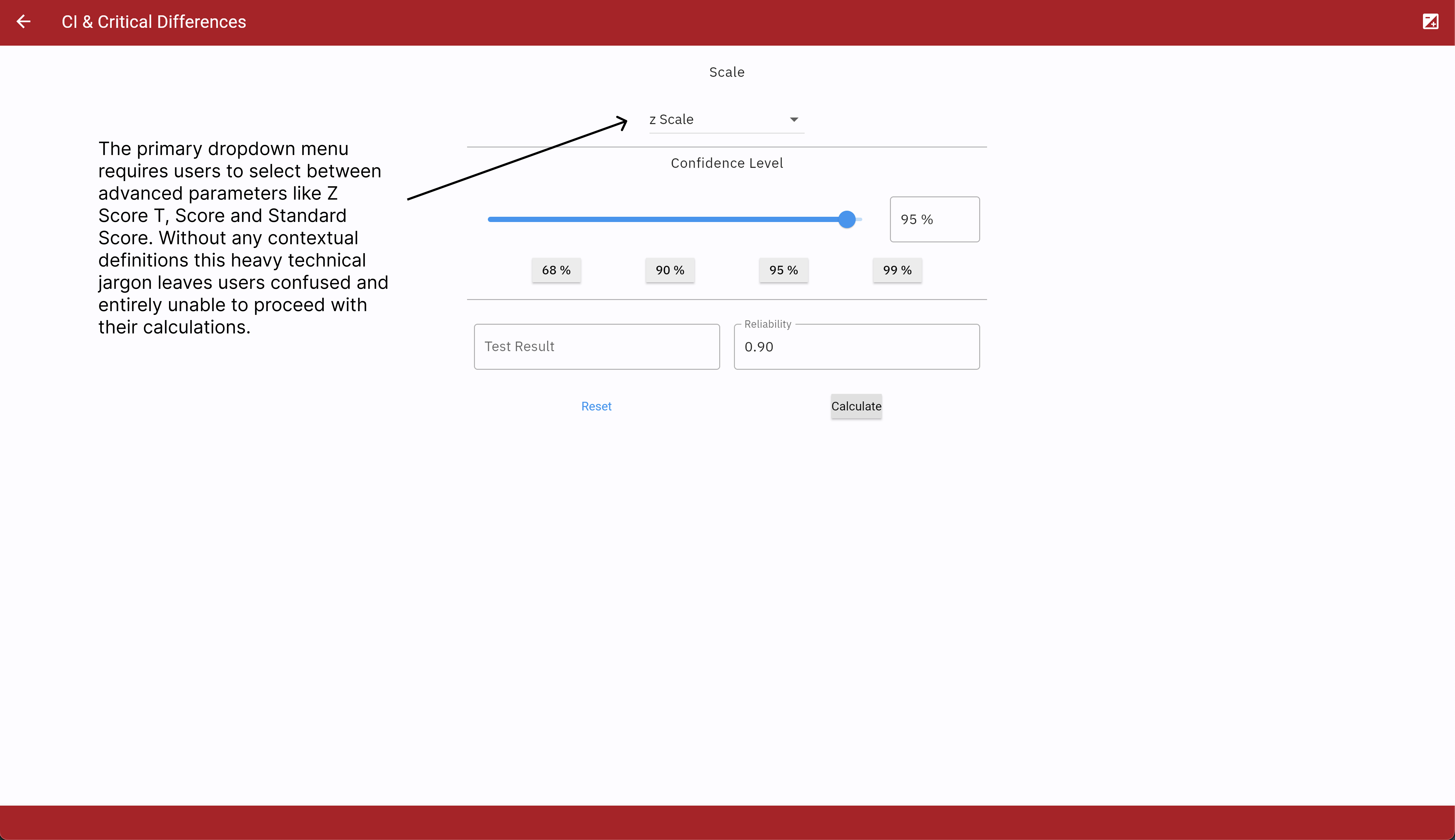
The core calculation feature required users to make selections from a dropdown menu populated entirely with advanced technical jargon including Z Score, T Score and Standard Score. This lack of conversational language prevented users from confidently proceeding with their clinical calculations because they lacked contextual clues.
The core calculation feature required users to make selections from a dropdown menu populated entirely with advanced technical jargon including Z Score, T Score and Standard Score. This lack of conversational language prevented users from confidently proceeding with their clinical calculations because they lacked contextual clues.
The Solution :
The Solution :
To resolve this I recommended introducing tooltips directly on the calculation screen to clarify the dropdown menu options. By adding targeted tooltips for Z Score, T Score and Standard Score the interface can display concise explanations in simple language preventing any further user confusion.
To resolve this I recommended introducing tooltips directly on the calculation screen to clarify the dropdown menu options. By adding targeted tooltips for Z Score, T Score and Standard Score the interface can display concise explanations in simple language preventing any further user confusion.


My Learnings & Reflections :
I learned that utilizing highly advanced vocabulary in task questions creates unnecessary barriers for non native speakers during testing.
I realized how essential active leadership and close team collaboration are, when coordinating and streamlining research efforts.
I realized that failing to create a brief highlight video from our session recordings was a missed opportunity for stakeholder engagement. Showing the actual testing process in action would have made the research much easier for non technical audiences to understand. This realization demonstrated the true value of visual storytelling and its unique ability to connect stakeholders directly to the user journey.
More Projects


UI Refinement
Eye Tracking Analysis
Semi Structured Interviews
Task Efficiency
Hogrefe Usability Testing
A strategic usability investigation of the Hogrefe Diagnostic Toolbox focused on clearing severe navigation barriers. By translating eye tracking data into actionable insights, this research delivers targeted UX solutions that improve feature discoverability and align the software with natural clinical workflows.
Year :
2024
Industry :
HealthTech and Diagnostics
Role :
Lead UX Researcher
Project Duration :
4 months
↑0%
↑0%
Redesigning the core navigation menu with highly descriptive labels is expected to improve feature findability by 70% and completely eliminate repetitive user misclicks.
Redesigning the core navigation menu with highly descriptive labels is expected to improve feature findability by 70% and completely eliminate repetitive user misclicks.
Redesigning the core navigation menu with highly descriptive labels is expected to improve feature findability by 70% and completely eliminate repetitive user misclicks.
↓0%
↓0%
Clarifying complex domain jargon and refining input fields is projected to reduce overall cognitive load by 40% allowing professional users to easily process clinical data without unnecessary mental fatigue.
Clarifying complex domain jargon and refining input fields is projected to reduce overall cognitive load by 40% allowing professional users to easily process clinical data without unnecessary mental fatigue.
Clarifying complex domain jargon and refining input fields is projected to reduce overall cognitive load by 40% allowing professional users to easily process clinical data without unnecessary mental fatigue.
↑0%
↑0%
Streamlining the primary entry points is projected to drive an 80% increase in task efficiency successfully closing the massive completion time gap between clinical tasks.
Streamlining the primary entry points is projected to drive an 80% increase in task efficiency successfully closing the massive completion time gap between clinical tasks.
Streamlining the primary entry points is projected to drive an 80% increase in task efficiency successfully closing the massive completion time gap between clinical tasks.
My role :
I led the complete usability research lifecycle for this project. My responsibilities ranged from designing the test protocol and setting up the Tobii Pro eye tracking system to moderating the live sessions and taking detailed behavioral notes. I then synthesized these raw observations using affinity mapping and applied Likert scale ratings to clearly quantify user task difficulty.
CONTEXT :
The primary goal of this research was to evaluate the usability of the Hogrefe Diagnostic Toolbox website. By delivering actionable insights to refine the UI the objective was to significantly improve overall user satisfaction and daily task efficiency for clinical professionals.
THE CORE CHALLENGE :
Users of the diagnostic platform faced significant friction due to terminology overload, difficult feature discovery and missing input validation. The primary goal of this research was to evaluate the website and deliver actionable insights to refine the interface. By addressing these specific barriers the objective was to vastly improve overall user satisfaction and daily task efficiency.
Methods :
• Semi-Structured Interviews
• Think-Aloud Technique
• Eye-Tracking (Tobii Pro)
• Observation & Video Recording
The Testing Scenarios :
To ensure our findings were grounded in real world applications I structured the eye tracking observation around two highly critical clinical workflows.
Task 01 :
Task 01 :
Users were asked to imagine they just conducted a psychological assessment and needed to locate and use the feature for converting standard test scores.
Users were asked to imagine they just conducted a psychological assessment and needed to locate and use the feature for converting standard test scores.
Task 02
Task 02
Users were instructed to calculate the confidence interval and critical difference for specific test results to determine statistical significance.
Users were instructed to calculate the confidence interval and critical difference for specific test results to determine statistical significance.
Uncovering the Friction Points :
After observing the testing sessions I synthesized the behavioral data to identify exactly where users struggled the most. I categorized these insights into three core friction points to directly inform the interface redesign and eliminate the heaviest barriers to task completion.
Friction Point A: Feature Discovery and Navigation
Friction Point A: Feature Discovery and Navigation
The initial interaction with the Hogrefe Diagnostic Toolbox revealed a significant barrier to entry. Participants struggled to understand the core purpose of the platform immediately upon landing.
The initial interaction with the Hogrefe Diagnostic Toolbox revealed a significant barrier to entry. Participants struggled to understand the core purpose of the platform immediately upon landing.
The Problem :
The Problem :
Upon initially landing on the homepage all three usability testing participants experienced immediate confusion regarding the core functionality of the website. Because there was a complete absence of an onboarding process or introductory guidance the users were left without any context on how to begin their tasks or navigate the available clinical tools.
Upon initially landing on the homepage all three usability testing participants experienced immediate confusion regarding the core functionality of the website. Because there was a complete absence of an onboarding process or introductory guidance the users were left without any context on how to begin their tasks or navigate the available clinical tools.
The Cause :
The Cause :
There was no onboarding process to explain the platform and no background information provided to users about the core purpose of the diagnostic website.
There was no onboarding process to explain the platform and no background information provided to users about the core purpose of the diagnostic website.
The Solution :
The Solution :
Instead of a static tutorial I proposed a dynamic guided walkthrough to quickly orient first time users. By visually highlighting specific features on the screen this approach immediately draws user attention to key functions and ensures they know exactly where to begin their diagnostic tasks.
Instead of a static tutorial I proposed a dynamic guided walkthrough to quickly orient first time users. By visually highlighting specific features on the screen this approach immediately draws user attention to key functions and ensures they know exactly where to begin their diagnostic tasks.
Friction Point B: Feedback and Input Validation
Friction Point B: Feedback and Input Validation
Once navigating into a specific diagnostic tool the lack of system communication caused immediate user hesitation. Participants were left guessing how to properly interact with the core calculation features.
Once navigating into a specific diagnostic tool the lack of system communication caused immediate user hesitation. Participants were left guessing how to properly interact with the core calculation features.
The Problem :
The Problem :
Upon selecting the converting standard values feature all three usability testing participants experienced immediate task paralysis. Because the system failed to provide any clear initial feedback or guidance users were left completely uncertain about how to proceed with their calculations.
Upon selecting the converting standard values feature all three usability testing participants experienced immediate task paralysis. Because the system failed to provide any clear initial feedback or guidance users were left completely uncertain about how to proceed with their calculations.
The Cause :
The Cause :
There was a severe lack of system feedback guiding the user on what they should do. Users did not know which input fields to fill in or whether they should just drag the slider bar.
There was a severe lack of system feedback guiding the user on what they should do. Users did not know which input fields to fill in or whether they should just drag the slider bar.
The Solution :
The Solution :
I developed an input validation strategy that includes placeholder examples in numeric fields to demonstrate valid formats. I also recommended real time inline error messaging to guide users if they input values exceeding the acceptable range or attempt to calculate without entering required data. Additionally I suggested incorporating explanatory text to clarify exactly how to use the slider and interact with this Convert Standard Values feature thereby guiding users to successful task completion without frustration.
These specific recommendations that include placeholder numeric values, real time inline error messaging, and explanatory slider instructions are now fully live on the production website, successfully eliminating the user hesitation and task paralysis observed during testing.
I developed an input validation strategy that includes placeholder examples in numeric fields to demonstrate valid formats. I also recommended real time inline error messaging to guide users if they input values exceeding the acceptable range or attempt to calculate without entering required data. Additionally I suggested incorporating explanatory text to clarify exactly how to use the slider and interact with this Convert Standard Values feature thereby guiding users to successful task completion without frustration.
These specific recommendations that include placeholder numeric values, real time inline error messaging, and explanatory slider instructions are now fully live on the production website, successfully eliminating the user hesitation and task paralysis observed during testing.
Friction Point C: Terminology and Domain Jargon
Friction Point C: Terminology and Domain Jargon
The highly clinical nature of the software presented a severe learnability curve. Complex domain specific language embedded within the interface directly hindered the participants from completing their assigned tasks.
The highly clinical nature of the software presented a severe learnability curve. Complex domain specific language embedded within the interface directly hindered the participants from completing their assigned tasks.
The Problem :
The Problem :
During the usability testing phase two of the participants struggled significantly with the core tasks because they did not understand the specialized language. The interface relied heavily on statistical jargon for calculating confidence intervals and critical differences which immediately increased cognitive load and stalled their overall progress.
During the usability testing phase two of the participants struggled significantly with the core tasks because they did not understand the specialized language. The interface relied heavily on statistical jargon for calculating confidence intervals and critical differences which immediately increased cognitive load and stalled their overall progress.
The Cause :
The Cause :
The core calculation feature required users to make selections from a dropdown menu populated entirely with advanced technical jargon including Z Score, T Score and Standard Score. This lack of conversational language prevented users from confidently proceeding with their clinical calculations because they lacked contextual clues.
The core calculation feature required users to make selections from a dropdown menu populated entirely with advanced technical jargon including Z Score, T Score and Standard Score. This lack of conversational language prevented users from confidently proceeding with their clinical calculations because they lacked contextual clues.
The Solution :
The Solution :
To resolve this I recommended introducing tooltips directly on the calculation screen to clarify the dropdown menu options. By adding targeted tooltips for Z Score, T Score and Standard Score the interface can display concise explanations in simple language preventing any further user confusion.
To resolve this I recommended introducing tooltips directly on the calculation screen to clarify the dropdown menu options. By adding targeted tooltips for Z Score, T Score and Standard Score the interface can display concise explanations in simple language preventing any further user confusion.
My Learnings & Reflections :
I learned that utilizing highly advanced vocabulary in task questions creates unnecessary barriers for non native speakers during testing.
I realized how essential active leadership and close team collaboration are, when coordinating and streamlining research efforts.
I realized that failing to create a brief highlight video from our session recordings was a missed opportunity for stakeholder engagement. Showing the actual testing process in action would have made the research much easier for non technical audiences to understand. This realization demonstrated the true value of visual storytelling and its unique ability to connect stakeholders directly to the user journey.
More Projects
UI Refinement
Eye Tracking Analysis
Semi Structured Interviews
Task Efficiency
Hogrefe Usability Testing
A strategic usability investigation of the Hogrefe Diagnostic Toolbox focused on clearing severe navigation barriers. By translating eye tracking data into actionable insights, this research delivers targeted UX solutions that improve feature discoverability and align the software with natural clinical workflows.
Year :
2024
Industry :
HealthTech and Diagnostics
Role :
Lead UX Researcher
Project Duration :
4 months
↑0%
↑0%
Redesigning the core navigation menu with highly descriptive labels is expected to improve feature findability by 70% and completely eliminate repetitive user misclicks.
Redesigning the core navigation menu with highly descriptive labels is expected to improve feature findability by 70% and completely eliminate repetitive user misclicks.
Redesigning the core navigation menu with highly descriptive labels is expected to improve feature findability by 70% and completely eliminate repetitive user misclicks.
↓0%
↓0%
Clarifying complex domain jargon and refining input fields is projected to reduce overall cognitive load by 40% allowing professional users to easily process clinical data without unnecessary mental fatigue.
Clarifying complex domain jargon and refining input fields is projected to reduce overall cognitive load by 40% allowing professional users to easily process clinical data without unnecessary mental fatigue.
Clarifying complex domain jargon and refining input fields is projected to reduce overall cognitive load by 40% allowing professional users to easily process clinical data without unnecessary mental fatigue.
↑0%
↑0%
Streamlining the primary entry points is projected to drive an 80% increase in task efficiency successfully closing the massive completion time gap between clinical tasks.
Streamlining the primary entry points is projected to drive an 80% increase in task efficiency successfully closing the massive completion time gap between clinical tasks.
Streamlining the primary entry points is projected to drive an 80% increase in task efficiency successfully closing the massive completion time gap between clinical tasks.
My role :
I led the complete usability research lifecycle for this project. My responsibilities ranged from designing the test protocol and setting up the Tobii Pro eye tracking system to moderating the live sessions and taking detailed behavioral notes. I then synthesized these raw observations using affinity mapping and applied Likert scale ratings to clearly quantify user task difficulty.
CONTEXT :
The primary goal of this research was to evaluate the usability of the Hogrefe Diagnostic Toolbox website. By delivering actionable insights to refine the UI the objective was to significantly improve overall user satisfaction and daily task efficiency for clinical professionals.
THE CORE CHALLENGE :
Users of the diagnostic platform faced significant friction due to terminology overload, difficult feature discovery and missing input validation. The primary goal of this research was to evaluate the website and deliver actionable insights to refine the interface. By addressing these specific barriers the objective was to vastly improve overall user satisfaction and daily task efficiency.
Methods :
• Semi-Structured Interviews
• Think-Aloud Technique
• Eye-Tracking (Tobii Pro)
• Observation & Video Recording
The Testing Scenarios :
To ensure our findings were grounded in real world applications I structured the eye tracking observation around two highly critical clinical workflows.
Task 01 :
Task 01 :
Users were asked to imagine they just conducted a psychological assessment and needed to locate and use the feature for converting standard test scores.
Users were asked to imagine they just conducted a psychological assessment and needed to locate and use the feature for converting standard test scores.
Task 02
Task 02
Users were instructed to calculate the confidence interval and critical difference for specific test results to determine statistical significance.
Users were instructed to calculate the confidence interval and critical difference for specific test results to determine statistical significance.
Uncovering the Friction Points :
After observing the testing sessions I synthesized the behavioral data to identify exactly where users struggled the most. I categorized these insights into three core friction points to directly inform the interface redesign and eliminate the heaviest barriers to task completion.
Friction Point A: Feature Discovery and Navigation
Friction Point A: Feature Discovery and Navigation
The initial interaction with the Hogrefe Diagnostic Toolbox revealed a significant barrier to entry. Participants struggled to understand the core purpose of the platform immediately upon landing.
The initial interaction with the Hogrefe Diagnostic Toolbox revealed a significant barrier to entry. Participants struggled to understand the core purpose of the platform immediately upon landing.
The Problem :
The Problem :
Upon initially landing on the homepage all three usability testing participants experienced immediate confusion regarding the core functionality of the website. Because there was a complete absence of an onboarding process or introductory guidance the users were left without any context on how to begin their tasks or navigate the available clinical tools.
Upon initially landing on the homepage all three usability testing participants experienced immediate confusion regarding the core functionality of the website. Because there was a complete absence of an onboarding process or introductory guidance the users were left without any context on how to begin their tasks or navigate the available clinical tools.
The Cause :
The Cause :
There was no onboarding process to explain the platform and no background information provided to users about the core purpose of the diagnostic website.
There was no onboarding process to explain the platform and no background information provided to users about the core purpose of the diagnostic website.
The Solution :
The Solution :
Instead of a static tutorial I proposed a dynamic guided walkthrough to quickly orient first time users. By visually highlighting specific features on the screen this approach immediately draws user attention to key functions and ensures they know exactly where to begin their diagnostic tasks.
Instead of a static tutorial I proposed a dynamic guided walkthrough to quickly orient first time users. By visually highlighting specific features on the screen this approach immediately draws user attention to key functions and ensures they know exactly where to begin their diagnostic tasks.
Friction Point B: Feedback and Input Validation
Friction Point B: Feedback and Input Validation
Once navigating into a specific diagnostic tool the lack of system communication caused immediate user hesitation. Participants were left guessing how to properly interact with the core calculation features.
Once navigating into a specific diagnostic tool the lack of system communication caused immediate user hesitation. Participants were left guessing how to properly interact with the core calculation features.
The Problem :
The Problem :
Upon selecting the converting standard values feature all three usability testing participants experienced immediate task paralysis. Because the system failed to provide any clear initial feedback or guidance users were left completely uncertain about how to proceed with their calculations.
Upon selecting the converting standard values feature all three usability testing participants experienced immediate task paralysis. Because the system failed to provide any clear initial feedback or guidance users were left completely uncertain about how to proceed with their calculations.
The Cause :
The Cause :
There was a severe lack of system feedback guiding the user on what they should do. Users did not know which input fields to fill in or whether they should just drag the slider bar.
There was a severe lack of system feedback guiding the user on what they should do. Users did not know which input fields to fill in or whether they should just drag the slider bar.
The Solution :
The Solution :
I developed an input validation strategy that includes placeholder examples in numeric fields to demonstrate valid formats. I also recommended real time inline error messaging to guide users if they input values exceeding the acceptable range or attempt to calculate without entering required data. Additionally I suggested incorporating explanatory text to clarify exactly how to use the slider and interact with this Convert Standard Values feature thereby guiding users to successful task completion without frustration.
These specific recommendations that include placeholder numeric values, real time inline error messaging, and explanatory slider instructions are now fully live on the production website, successfully eliminating the user hesitation and task paralysis observed during testing.
I developed an input validation strategy that includes placeholder examples in numeric fields to demonstrate valid formats. I also recommended real time inline error messaging to guide users if they input values exceeding the acceptable range or attempt to calculate without entering required data. Additionally I suggested incorporating explanatory text to clarify exactly how to use the slider and interact with this Convert Standard Values feature thereby guiding users to successful task completion without frustration.
These specific recommendations that include placeholder numeric values, real time inline error messaging, and explanatory slider instructions are now fully live on the production website, successfully eliminating the user hesitation and task paralysis observed during testing.
Friction Point C: Terminology and Domain Jargon
Friction Point C: Terminology and Domain Jargon
The highly clinical nature of the software presented a severe learnability curve. Complex domain specific language embedded within the interface directly hindered the participants from completing their assigned tasks.
The highly clinical nature of the software presented a severe learnability curve. Complex domain specific language embedded within the interface directly hindered the participants from completing their assigned tasks.
The Problem :
The Problem :
During the usability testing phase two of the participants struggled significantly with the core tasks because they did not understand the specialized language. The interface relied heavily on statistical jargon for calculating confidence intervals and critical differences which immediately increased cognitive load and stalled their overall progress.
During the usability testing phase two of the participants struggled significantly with the core tasks because they did not understand the specialized language. The interface relied heavily on statistical jargon for calculating confidence intervals and critical differences which immediately increased cognitive load and stalled their overall progress.
The Cause :
The Cause :
The core calculation feature required users to make selections from a dropdown menu populated entirely with advanced technical jargon including Z Score, T Score and Standard Score. This lack of conversational language prevented users from confidently proceeding with their clinical calculations because they lacked contextual clues.
The core calculation feature required users to make selections from a dropdown menu populated entirely with advanced technical jargon including Z Score, T Score and Standard Score. This lack of conversational language prevented users from confidently proceeding with their clinical calculations because they lacked contextual clues.
The Solution :
The Solution :
To resolve this I recommended introducing tooltips directly on the calculation screen to clarify the dropdown menu options. By adding targeted tooltips for Z Score, T Score and Standard Score the interface can display concise explanations in simple language preventing any further user confusion.
To resolve this I recommended introducing tooltips directly on the calculation screen to clarify the dropdown menu options. By adding targeted tooltips for Z Score, T Score and Standard Score the interface can display concise explanations in simple language preventing any further user confusion.
My Learnings & Reflections :
I learned that utilizing highly advanced vocabulary in task questions creates unnecessary barriers for non native speakers during testing.
I realized how essential active leadership and close team collaboration are, when coordinating and streamlining research efforts.
I realized that failing to create a brief highlight video from our session recordings was a missed opportunity for stakeholder engagement. Showing the actual testing process in action would have made the research much easier for non technical audiences to understand. This realization demonstrated the true value of visual storytelling and its unique ability to connect stakeholders directly to the user journey.