Cognitive Walkthrough
UX Research
User Flow Simplification
Task Efficiency
Blackboard Heuristic Evaluation
An inspection based evaluation of the Blackboard Ultra student portal combining expert reviews, AI evaluation. By addressing critical heuristic violations, the project delivered strategic UX improvements, including a show password feature now live in production, making logging in and joining classes highly intuitive.
Year :
2024
Industry :
EdTech
Role :
UX Evaluator & Strategist
Project Duration :
3 months
↑0%
↑0%
Repositioning the ‘Join Session’ CTA to a more prominent location is projected to improve its discoverability by ~70%, based on reduced navigation steps and improved visual hierarchy.
Repositioning the ‘Join Session’ CTA to a more prominent location is projected to improve its discoverability by ~70%, based on reduced navigation steps and improved visual hierarchy.
Repositioning the ‘Join Session’ CTA to a more prominent location is projected to improve its discoverability by ~70%, based on reduced navigation steps and improved visual hierarchy.
↓0%
↓0%
By removing just 2 clicks from the class join flow, the improved design prevents ~500 unnecessary page loads per day, saving an estimated 0.5 kWh of server power daily and Eliminating one unnecessary page load per user reduces total server requests by an estimated ~17%.
By removing just 2 clicks from the class join flow, the improved design prevents ~500 unnecessary page loads per day, saving an estimated 0.5 kWh of server power daily and Eliminating one unnecessary page load per user reduces total server requests by an estimated ~17%.
By removing just 2 clicks from the class join flow, the improved design prevents ~500 unnecessary page loads per day, saving an estimated 0.5 kWh of server power daily and Eliminating one unnecessary page load per user reduces total server requests by an estimated ~17%.
↓0%
↓0%
Placing the ‘Join Session’ button directly beside the subject name can reduce the average session-joining time by ~9%, improving flow efficiency for returning users.
Placing the ‘Join Session’ button directly beside the subject name can reduce the average session-joining time by ~9%, improving flow efficiency for returning users.
Placing the ‘Join Session’ button directly beside the subject name can reduce the average session-joining time by ~9%, improving flow efficiency for returning users.
My role :
I contributed as an Expert UX Evaluator and Data Synthesizer for enhancing UX for of the Blackboard Ultra platform.
I also evaluated AI-generated responses, compared them with expert inputs, to form actionable UX improvements.
I proposed user-centered design solutions tailored for international student needs.
I conducted cognitive walkthroughs and identified critical heuristic violations.
CONTEXT :
This project examined the usability of the Blackboard Ultra student portal, specifically targeting the login flow, automated email notifications, and online class access to understand how students navigate the platform and join live sessions. By combining expert reviews and AI evaluation, the project explored key friction points such as a convoluted login process lacking a show password option, low visibility of primary actions, and confusing notification structures. The primary objective was to resolve these critical heuristic violations, transforming a high friction process into an intuitive and efficient experience for students.
THE CORE CHALLENGE :
Despite being a primary academic tool, the platform architecture forced users into highly inefficient workflows. Students faced a convoluted 14 click journey just to access live sessions, heavily hindered by buried primary action buttons and unclear system feedback. Additionally, automated course notifications lacked clear subject hierarchies, leaving students guessing about essential content updates.
Methods :
Cognitive Walkthroughs
Heuristic Analysis
Uncovering the Friction Points :
To pinpoint the exact cognitive barriers disrupting the student experience, I systematically mapped the core workflows.
Journey 01: Content Discovery & Access
Journey 01: Content Discovery & Access
The Cognitive Barrier:
For students unfamiliar with the university systems, vague system messages and poor login UX created a severe cognitive barrier, causing them to miss important resources.
Heuristic Violations:
This specific journey directly violated core usability heuristics, including self descriptiveness, conformity with user expectations, and user engagement.
The Cognitive Barrier:
For students unfamiliar with the university systems, vague system messages and poor login UX created a severe cognitive barrier, causing them to miss important resources.
Heuristic Violations:
This specific journey directly violated core usability heuristics, including self descriptiveness, conformity with user expectations, and user engagement.
Friction Point A: Contextless Notifications
Friction Point A: Contextless Notifications
The Insight:
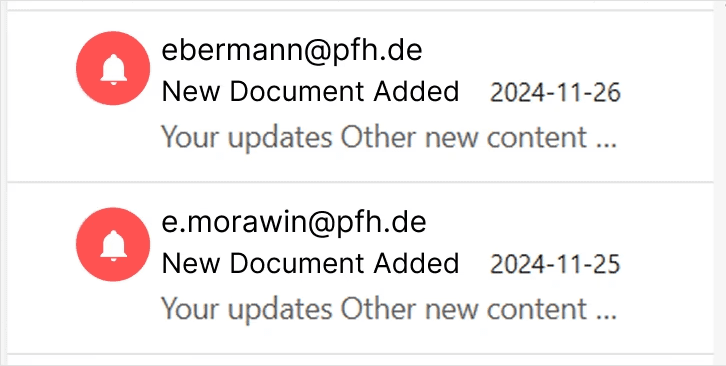
Imagine receiving an essential academic update simply titled "Daily Notifications." It tells student absolutely nothing about which course was updated or what the content actually is. Because the sender address felt robotic and lacked a clear visual indicator, these emails had terrible visibility and easily got lost in crowded student inboxes. They failed the basic rule of self descriptiveness because students could not easily identify the context of the document or why it mattered.
The Solution:
I proposed replacing the generic "Daily Notifications" subject line entirely with exact titles like "New Document Added" so students know the precise content of an email before even opening it. To make the communication more personal and trustworthy, I recommended using the professor's own email address as the sender and integrating a highly visible red bell icon so the course updates stand out instantly in the mailbox.
The Insight:
Imagine receiving an essential academic update simply titled "Daily Notifications." It tells student absolutely nothing about which course was updated or what the content actually is. Because the sender address felt robotic and lacked a clear visual indicator, these emails had terrible visibility and easily got lost in crowded student inboxes. They failed the basic rule of self descriptiveness because students could not easily identify the context of the document or why it mattered.
The Solution:
I proposed replacing the generic "Daily Notifications" subject line entirely with exact titles like "New Document Added" so students know the precise content of an email before even opening it. To make the communication more personal and trustworthy, I recommended using the professor's own email address as the sender and integrating a highly visible red bell icon so the course updates stand out instantly in the mailbox.

Friction Point B: The Authentication Block
Friction Point B: The Authentication Block
The Insight:
After clicking the email link, international students hit an immediate wall. The crucial PFH SSO login option was hidden inside a drop down menu, making it incredibly difficult to locate. Furthermore, all login instructions were written exclusively in German, leaving international students who do not speak the language unable to understand the required steps. The screen also lacked a basic visibility toggle to view passwords, and students were forced through redundant authentication steps before successfully logging in.
The Solution:
I proposed standardizing the flow by removing the hidden drop down menu and consolidating the redundant steps into a single, streamlined login screen. To solve the navigation and language barriers, I recommended replacing the hidden lists with two clear, adjacent tabs labeled "For staff" and "For student" and translating all login instructions into English or user should change the language with toggle button. Finally, I introduced a dedicated show password icon to improve accessibility. This specific password visibility recommendation was highly actionable and successfully implemented live by the university.
The Insight:
After clicking the email link, international students hit an immediate wall. The crucial PFH SSO login option was hidden inside a drop down menu, making it incredibly difficult to locate. Furthermore, all login instructions were written exclusively in German, leaving international students who do not speak the language unable to understand the required steps. The screen also lacked a basic visibility toggle to view passwords, and students were forced through redundant authentication steps before successfully logging in.
The Solution:
I proposed standardizing the flow by removing the hidden drop down menu and consolidating the redundant steps into a single, streamlined login screen. To solve the navigation and language barriers, I recommended replacing the hidden lists with two clear, adjacent tabs labeled "For staff" and "For student" and translating all login instructions into English or user should change the language with toggle button. Finally, I introduced a dedicated show password icon to improve accessibility. This specific password visibility recommendation was highly actionable and successfully implemented live by the university.


Journey 02: Live Session Access
Journey 02: Live Session Access
The Core Barrier:
Students rushing to join ongoing classes, faced severe confusion due to hidden buttons and a complete lack of live status indicators, resulting in anxiety and missed academic sessions.
Heuristics Violations:
This specific journey directly violated core usability heuristics, including visibility of system status, match between system and the real world, and self-descriptiveness.
The Core Barrier:
Students rushing to join ongoing classes, faced severe confusion due to hidden buttons and a complete lack of live status indicators, resulting in anxiety and missed academic sessions.
Heuristics Violations:
This specific journey directly violated core usability heuristics, including visibility of system status, match between system and the real world, and self-descriptiveness.
Friction Point C: The Buried Live Session
Friction Point C: The Buried Live Session
The Insight:
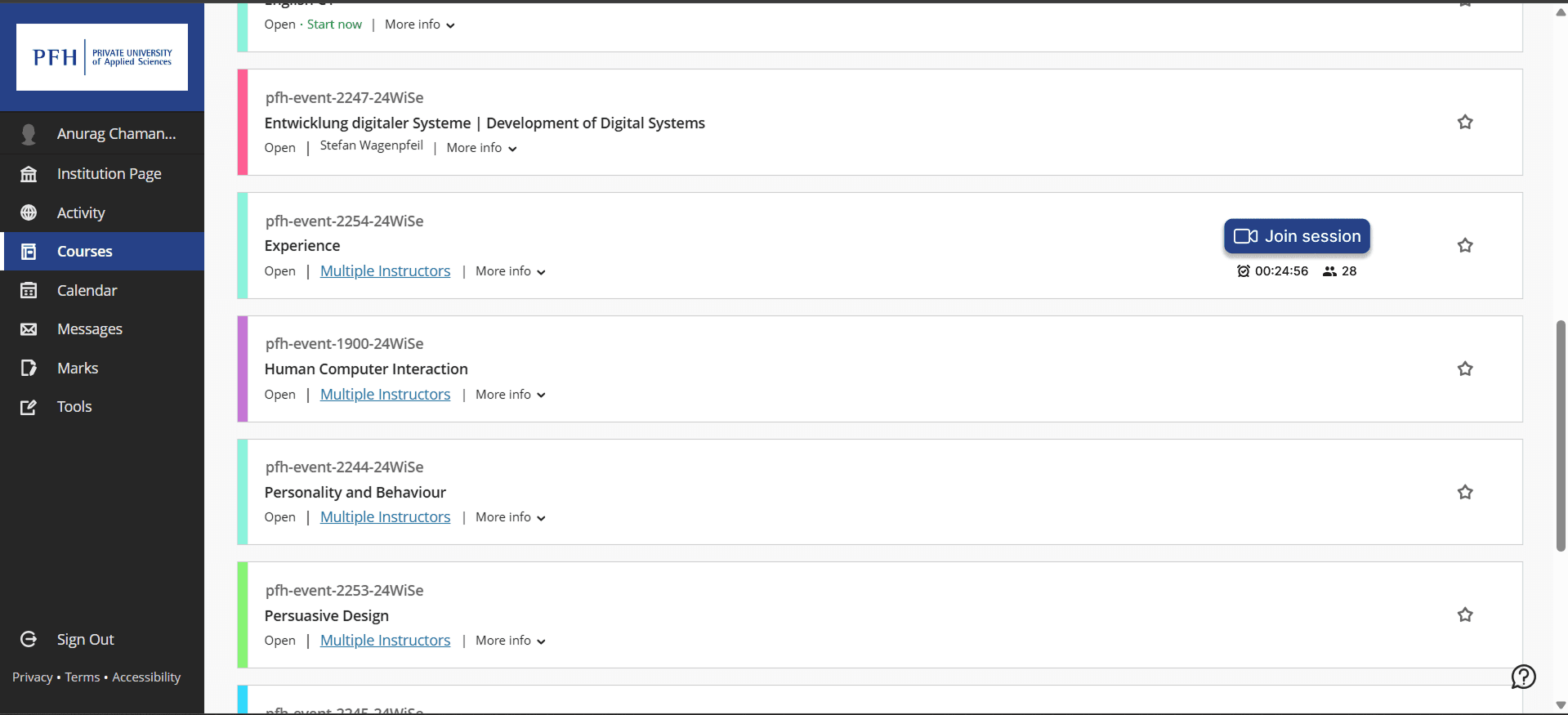
Imagine a student rushing to join an online class twenty minutes late after a work meeting. When they reach the main dashboard, there is no real time indicator showing which course actually has an active session. Once they guess the right course, the "Join Session" button is completely buried mid page and outside the immediate view. The platform fails to show how long the session has been running, how many participants are already inside, or even if the session has officially started. This forces panicked students through too many redundant actions just to find their class, directly violating the visibility of system status and self descriptiveness heuristics.
The Solution:
I proposed a complete redesign of the live session entry point to instantly reassure late or rushing students. I recommended highlighting the active session clearly on the main dashboard and moving the "Join Session" button so it sits prominently adjacent to the subject title for instant visibility. To further improve system feedback and match real world expectations, I advised displaying the current number of attending participants directly near to the button. This eliminates the guesswork, reduces the required clicks, and gives students immediate confidence that they are entering the correct live environment.
The Insight:
Imagine a student rushing to join an online class twenty minutes late after a work meeting. When they reach the main dashboard, there is no real time indicator showing which course actually has an active session. Once they guess the right course, the "Join Session" button is completely buried mid page and outside the immediate view. The platform fails to show how long the session has been running, how many participants are already inside, or even if the session has officially started. This forces panicked students through too many redundant actions just to find their class, directly violating the visibility of system status and self descriptiveness heuristics.
The Solution:
I proposed a complete redesign of the live session entry point to instantly reassure late or rushing students. I recommended highlighting the active session clearly on the main dashboard and moving the "Join Session" button so it sits prominently adjacent to the subject title for instant visibility. To further improve system feedback and match real world expectations, I advised displaying the current number of attending participants directly near to the button. This eliminates the guesswork, reduces the required clicks, and gives students immediate confidence that they are entering the correct live environment.



My Learnings & Reflections :
Balancing Friction and Security
While reducing friction is a top priority, I realized that certain login steps are absolutely necessary for data protection. This project taught me how to balance smooth usability with essential system security.The Cost of Context Switching
As university portal has multiple domains which is forcing users to jump between fragmented domains completely disrupts their mental models. I saw firsthand how inconsistent domain structures drastically increase cognitive load.Words Shape Expectations
Labels must deliver exactly what they promise. Misleading text caused users to expect features that were not there, highlighting the crucial role of clear UX writing and self descriptiveness.Visibility Drives Efficiency
When key actions like joining a live session are buried, it kills task efficiency. This reinforced my understanding of strategic button placement and clear visual hierarchy.Aligning Brands with Mental Models
A unified name implies a unified platform. When students had to leave the main portal just to access course materials, it broke their trust. I learned that product naming deeply affects overall navigation logic.Good UX is Sustainable UX
I realized that redundant logins do not just frustrate users, but they increase server load and energy consumption. Streamlining flows perfectly benefits both human behavior and backend technical stability.
More Projects


Cognitive Walkthrough
UX Research
User Flow Simplification
Task Efficiency
Blackboard Heuristic Evaluation
An inspection based evaluation of the Blackboard Ultra student portal combining expert reviews, AI evaluation. By addressing critical heuristic violations, the project delivered strategic UX improvements, including a show password feature now live in production, making logging in and joining classes highly intuitive.
Year :
2024
Industry :
EdTech
Role :
UX Evaluator & Strategist
Project Duration :
3 months
↑0%
↑0%
Repositioning the ‘Join Session’ CTA to a more prominent location is projected to improve its discoverability by ~70%, based on reduced navigation steps and improved visual hierarchy.
Repositioning the ‘Join Session’ CTA to a more prominent location is projected to improve its discoverability by ~70%, based on reduced navigation steps and improved visual hierarchy.
Repositioning the ‘Join Session’ CTA to a more prominent location is projected to improve its discoverability by ~70%, based on reduced navigation steps and improved visual hierarchy.
↓0%
↓0%
By removing just 2 clicks from the class join flow, the improved design prevents ~500 unnecessary page loads per day, saving an estimated 0.5 kWh of server power daily and Eliminating one unnecessary page load per user reduces total server requests by an estimated ~17%.
By removing just 2 clicks from the class join flow, the improved design prevents ~500 unnecessary page loads per day, saving an estimated 0.5 kWh of server power daily and Eliminating one unnecessary page load per user reduces total server requests by an estimated ~17%.
By removing just 2 clicks from the class join flow, the improved design prevents ~500 unnecessary page loads per day, saving an estimated 0.5 kWh of server power daily and Eliminating one unnecessary page load per user reduces total server requests by an estimated ~17%.
↓0%
↓0%
Placing the ‘Join Session’ button directly beside the subject name can reduce the average session-joining time by ~9%, improving flow efficiency for returning users.
Placing the ‘Join Session’ button directly beside the subject name can reduce the average session-joining time by ~9%, improving flow efficiency for returning users.
Placing the ‘Join Session’ button directly beside the subject name can reduce the average session-joining time by ~9%, improving flow efficiency for returning users.
My role :
I contributed as an Expert UX Evaluator and Data Synthesizer for enhancing UX for of the Blackboard Ultra platform.
I also evaluated AI-generated responses, compared them with expert inputs, to form actionable UX improvements.
I proposed user-centered design solutions tailored for international student needs.
I conducted cognitive walkthroughs and identified critical heuristic violations.
CONTEXT :
This project examined the usability of the Blackboard Ultra student portal, specifically targeting the login flow, automated email notifications, and online class access to understand how students navigate the platform and join live sessions. By combining expert reviews and AI evaluation, the project explored key friction points such as a convoluted login process lacking a show password option, low visibility of primary actions, and confusing notification structures. The primary objective was to resolve these critical heuristic violations, transforming a high friction process into an intuitive and efficient experience for students.
THE CORE CHALLENGE :
Despite being a primary academic tool, the platform architecture forced users into highly inefficient workflows. Students faced a convoluted 14 click journey just to access live sessions, heavily hindered by buried primary action buttons and unclear system feedback. Additionally, automated course notifications lacked clear subject hierarchies, leaving students guessing about essential content updates.
Methods :
Cognitive Walkthroughs
Heuristic Analysis
Uncovering the Friction Points :
To pinpoint the exact cognitive barriers disrupting the student experience, I systematically mapped the core workflows.
Journey 01: Content Discovery & Access
Journey 01: Content Discovery & Access
The Cognitive Barrier:
For students unfamiliar with the university systems, vague system messages and poor login UX created a severe cognitive barrier, causing them to miss important resources.
Heuristic Violations:
This specific journey directly violated core usability heuristics, including self descriptiveness, conformity with user expectations, and user engagement.
The Cognitive Barrier:
For students unfamiliar with the university systems, vague system messages and poor login UX created a severe cognitive barrier, causing them to miss important resources.
Heuristic Violations:
This specific journey directly violated core usability heuristics, including self descriptiveness, conformity with user expectations, and user engagement.
Friction Point A: Contextless Notifications
Friction Point A: Contextless Notifications
The Insight:
Imagine receiving an essential academic update simply titled "Daily Notifications." It tells student absolutely nothing about which course was updated or what the content actually is. Because the sender address felt robotic and lacked a clear visual indicator, these emails had terrible visibility and easily got lost in crowded student inboxes. They failed the basic rule of self descriptiveness because students could not easily identify the context of the document or why it mattered.
The Solution:
I proposed replacing the generic "Daily Notifications" subject line entirely with exact titles like "New Document Added" so students know the precise content of an email before even opening it. To make the communication more personal and trustworthy, I recommended using the professor's own email address as the sender and integrating a highly visible red bell icon so the course updates stand out instantly in the mailbox.
The Insight:
Imagine receiving an essential academic update simply titled "Daily Notifications." It tells student absolutely nothing about which course was updated or what the content actually is. Because the sender address felt robotic and lacked a clear visual indicator, these emails had terrible visibility and easily got lost in crowded student inboxes. They failed the basic rule of self descriptiveness because students could not easily identify the context of the document or why it mattered.
The Solution:
I proposed replacing the generic "Daily Notifications" subject line entirely with exact titles like "New Document Added" so students know the precise content of an email before even opening it. To make the communication more personal and trustworthy, I recommended using the professor's own email address as the sender and integrating a highly visible red bell icon so the course updates stand out instantly in the mailbox.
Friction Point B: The Authentication Block
Friction Point B: The Authentication Block
The Insight:
After clicking the email link, international students hit an immediate wall. The crucial PFH SSO login option was hidden inside a drop down menu, making it incredibly difficult to locate. Furthermore, all login instructions were written exclusively in German, leaving international students who do not speak the language unable to understand the required steps. The screen also lacked a basic visibility toggle to view passwords, and students were forced through redundant authentication steps before successfully logging in.
The Solution:
I proposed standardizing the flow by removing the hidden drop down menu and consolidating the redundant steps into a single, streamlined login screen. To solve the navigation and language barriers, I recommended replacing the hidden lists with two clear, adjacent tabs labeled "For staff" and "For student" and translating all login instructions into English or user should change the language with toggle button. Finally, I introduced a dedicated show password icon to improve accessibility. This specific password visibility recommendation was highly actionable and successfully implemented live by the university.
The Insight:
After clicking the email link, international students hit an immediate wall. The crucial PFH SSO login option was hidden inside a drop down menu, making it incredibly difficult to locate. Furthermore, all login instructions were written exclusively in German, leaving international students who do not speak the language unable to understand the required steps. The screen also lacked a basic visibility toggle to view passwords, and students were forced through redundant authentication steps before successfully logging in.
The Solution:
I proposed standardizing the flow by removing the hidden drop down menu and consolidating the redundant steps into a single, streamlined login screen. To solve the navigation and language barriers, I recommended replacing the hidden lists with two clear, adjacent tabs labeled "For staff" and "For student" and translating all login instructions into English or user should change the language with toggle button. Finally, I introduced a dedicated show password icon to improve accessibility. This specific password visibility recommendation was highly actionable and successfully implemented live by the university.
Journey 02: Live Session Access
Journey 02: Live Session Access
The Core Barrier:
Students rushing to join ongoing classes, faced severe confusion due to hidden buttons and a complete lack of live status indicators, resulting in anxiety and missed academic sessions.
Heuristics Violations:
This specific journey directly violated core usability heuristics, including visibility of system status, match between system and the real world, and self-descriptiveness.
The Core Barrier:
Students rushing to join ongoing classes, faced severe confusion due to hidden buttons and a complete lack of live status indicators, resulting in anxiety and missed academic sessions.
Heuristics Violations:
This specific journey directly violated core usability heuristics, including visibility of system status, match between system and the real world, and self-descriptiveness.
Friction Point C: The Buried Live Session
Friction Point C: The Buried Live Session
The Insight:
Imagine a student rushing to join an online class twenty minutes late after a work meeting. When they reach the main dashboard, there is no real time indicator showing which course actually has an active session. Once they guess the right course, the "Join Session" button is completely buried mid page and outside the immediate view. The platform fails to show how long the session has been running, how many participants are already inside, or even if the session has officially started. This forces panicked students through too many redundant actions just to find their class, directly violating the visibility of system status and self descriptiveness heuristics.
The Solution:
I proposed a complete redesign of the live session entry point to instantly reassure late or rushing students. I recommended highlighting the active session clearly on the main dashboard and moving the "Join Session" button so it sits prominently adjacent to the subject title for instant visibility. To further improve system feedback and match real world expectations, I advised displaying the current number of attending participants directly near to the button. This eliminates the guesswork, reduces the required clicks, and gives students immediate confidence that they are entering the correct live environment.
The Insight:
Imagine a student rushing to join an online class twenty minutes late after a work meeting. When they reach the main dashboard, there is no real time indicator showing which course actually has an active session. Once they guess the right course, the "Join Session" button is completely buried mid page and outside the immediate view. The platform fails to show how long the session has been running, how many participants are already inside, or even if the session has officially started. This forces panicked students through too many redundant actions just to find their class, directly violating the visibility of system status and self descriptiveness heuristics.
The Solution:
I proposed a complete redesign of the live session entry point to instantly reassure late or rushing students. I recommended highlighting the active session clearly on the main dashboard and moving the "Join Session" button so it sits prominently adjacent to the subject title for instant visibility. To further improve system feedback and match real world expectations, I advised displaying the current number of attending participants directly near to the button. This eliminates the guesswork, reduces the required clicks, and gives students immediate confidence that they are entering the correct live environment.
My Learnings & Reflections :
Balancing Friction and Security
While reducing friction is a top priority, I realized that certain login steps are absolutely necessary for data protection. This project taught me how to balance smooth usability with essential system security.The Cost of Context Switching
As university portal has multiple domains which is forcing users to jump between fragmented domains completely disrupts their mental models. I saw firsthand how inconsistent domain structures drastically increase cognitive load.Words Shape Expectations
Labels must deliver exactly what they promise. Misleading text caused users to expect features that were not there, highlighting the crucial role of clear UX writing and self descriptiveness.Visibility Drives Efficiency
When key actions like joining a live session are buried, it kills task efficiency. This reinforced my understanding of strategic button placement and clear visual hierarchy.Aligning Brands with Mental Models
A unified name implies a unified platform. When students had to leave the main portal just to access course materials, it broke their trust. I learned that product naming deeply affects overall navigation logic.Good UX is Sustainable UX
I realized that redundant logins do not just frustrate users, but they increase server load and energy consumption. Streamlining flows perfectly benefits both human behavior and backend technical stability.
More Projects
Cognitive Walkthrough
UX Research
User Flow Simplification
Task Efficiency
Blackboard Heuristic Evaluation
An inspection based evaluation of the Blackboard Ultra student portal combining expert reviews, AI evaluation. By addressing critical heuristic violations, the project delivered strategic UX improvements, including a show password feature now live in production, making logging in and joining classes highly intuitive.
Year :
2024
Industry :
EdTech
Role :
UX Evaluator & Strategist
Project Duration :
3 months
↑0%
↑0%
Repositioning the ‘Join Session’ CTA to a more prominent location is projected to improve its discoverability by ~70%, based on reduced navigation steps and improved visual hierarchy.
Repositioning the ‘Join Session’ CTA to a more prominent location is projected to improve its discoverability by ~70%, based on reduced navigation steps and improved visual hierarchy.
Repositioning the ‘Join Session’ CTA to a more prominent location is projected to improve its discoverability by ~70%, based on reduced navigation steps and improved visual hierarchy.
↓0%
↓0%
By removing just 2 clicks from the class join flow, the improved design prevents ~500 unnecessary page loads per day, saving an estimated 0.5 kWh of server power daily and Eliminating one unnecessary page load per user reduces total server requests by an estimated ~17%.
By removing just 2 clicks from the class join flow, the improved design prevents ~500 unnecessary page loads per day, saving an estimated 0.5 kWh of server power daily and Eliminating one unnecessary page load per user reduces total server requests by an estimated ~17%.
By removing just 2 clicks from the class join flow, the improved design prevents ~500 unnecessary page loads per day, saving an estimated 0.5 kWh of server power daily and Eliminating one unnecessary page load per user reduces total server requests by an estimated ~17%.
↓0%
↓0%
Placing the ‘Join Session’ button directly beside the subject name can reduce the average session-joining time by ~9%, improving flow efficiency for returning users.
Placing the ‘Join Session’ button directly beside the subject name can reduce the average session-joining time by ~9%, improving flow efficiency for returning users.
Placing the ‘Join Session’ button directly beside the subject name can reduce the average session-joining time by ~9%, improving flow efficiency for returning users.
My role :
I contributed as an Expert UX Evaluator and Data Synthesizer for enhancing UX for of the Blackboard Ultra platform.
I also evaluated AI-generated responses, compared them with expert inputs, to form actionable UX improvements.
I proposed user-centered design solutions tailored for international student needs.
I conducted cognitive walkthroughs and identified critical heuristic violations.
CONTEXT :
This project examined the usability of the Blackboard Ultra student portal, specifically targeting the login flow, automated email notifications, and online class access to understand how students navigate the platform and join live sessions. By combining expert reviews and AI evaluation, the project explored key friction points such as a convoluted login process lacking a show password option, low visibility of primary actions, and confusing notification structures. The primary objective was to resolve these critical heuristic violations, transforming a high friction process into an intuitive and efficient experience for students.
THE CORE CHALLENGE :
Despite being a primary academic tool, the platform architecture forced users into highly inefficient workflows. Students faced a convoluted 14 click journey just to access live sessions, heavily hindered by buried primary action buttons and unclear system feedback. Additionally, automated course notifications lacked clear subject hierarchies, leaving students guessing about essential content updates.
Methods :
Cognitive Walkthroughs
Heuristic Analysis
Uncovering the Friction Points :
To pinpoint the exact cognitive barriers disrupting the student experience, I systematically mapped the core workflows.
Journey 01: Content Discovery & Access
Journey 01: Content Discovery & Access
The Cognitive Barrier:
For students unfamiliar with the university systems, vague system messages and poor login UX created a severe cognitive barrier, causing them to miss important resources.
Heuristic Violations:
This specific journey directly violated core usability heuristics, including self descriptiveness, conformity with user expectations, and user engagement.
The Cognitive Barrier:
For students unfamiliar with the university systems, vague system messages and poor login UX created a severe cognitive barrier, causing them to miss important resources.
Heuristic Violations:
This specific journey directly violated core usability heuristics, including self descriptiveness, conformity with user expectations, and user engagement.
Friction Point A: Contextless Notifications
Friction Point A: Contextless Notifications
The Insight:
Imagine receiving an essential academic update simply titled "Daily Notifications." It tells student absolutely nothing about which course was updated or what the content actually is. Because the sender address felt robotic and lacked a clear visual indicator, these emails had terrible visibility and easily got lost in crowded student inboxes. They failed the basic rule of self descriptiveness because students could not easily identify the context of the document or why it mattered.
The Solution:
I proposed replacing the generic "Daily Notifications" subject line entirely with exact titles like "New Document Added" so students know the precise content of an email before even opening it. To make the communication more personal and trustworthy, I recommended using the professor's own email address as the sender and integrating a highly visible red bell icon so the course updates stand out instantly in the mailbox.
The Insight:
Imagine receiving an essential academic update simply titled "Daily Notifications." It tells student absolutely nothing about which course was updated or what the content actually is. Because the sender address felt robotic and lacked a clear visual indicator, these emails had terrible visibility and easily got lost in crowded student inboxes. They failed the basic rule of self descriptiveness because students could not easily identify the context of the document or why it mattered.
The Solution:
I proposed replacing the generic "Daily Notifications" subject line entirely with exact titles like "New Document Added" so students know the precise content of an email before even opening it. To make the communication more personal and trustworthy, I recommended using the professor's own email address as the sender and integrating a highly visible red bell icon so the course updates stand out instantly in the mailbox.
Friction Point B: The Authentication Block
Friction Point B: The Authentication Block
The Insight:
After clicking the email link, international students hit an immediate wall. The crucial PFH SSO login option was hidden inside a drop down menu, making it incredibly difficult to locate. Furthermore, all login instructions were written exclusively in German, leaving international students who do not speak the language unable to understand the required steps. The screen also lacked a basic visibility toggle to view passwords, and students were forced through redundant authentication steps before successfully logging in.
The Solution:
I proposed standardizing the flow by removing the hidden drop down menu and consolidating the redundant steps into a single, streamlined login screen. To solve the navigation and language barriers, I recommended replacing the hidden lists with two clear, adjacent tabs labeled "For staff" and "For student" and translating all login instructions into English or user should change the language with toggle button. Finally, I introduced a dedicated show password icon to improve accessibility. This specific password visibility recommendation was highly actionable and successfully implemented live by the university.
The Insight:
After clicking the email link, international students hit an immediate wall. The crucial PFH SSO login option was hidden inside a drop down menu, making it incredibly difficult to locate. Furthermore, all login instructions were written exclusively in German, leaving international students who do not speak the language unable to understand the required steps. The screen also lacked a basic visibility toggle to view passwords, and students were forced through redundant authentication steps before successfully logging in.
The Solution:
I proposed standardizing the flow by removing the hidden drop down menu and consolidating the redundant steps into a single, streamlined login screen. To solve the navigation and language barriers, I recommended replacing the hidden lists with two clear, adjacent tabs labeled "For staff" and "For student" and translating all login instructions into English or user should change the language with toggle button. Finally, I introduced a dedicated show password icon to improve accessibility. This specific password visibility recommendation was highly actionable and successfully implemented live by the university.
Journey 02: Live Session Access
Journey 02: Live Session Access
The Core Barrier:
Students rushing to join ongoing classes, faced severe confusion due to hidden buttons and a complete lack of live status indicators, resulting in anxiety and missed academic sessions.
Heuristics Violations:
This specific journey directly violated core usability heuristics, including visibility of system status, match between system and the real world, and self-descriptiveness.
The Core Barrier:
Students rushing to join ongoing classes, faced severe confusion due to hidden buttons and a complete lack of live status indicators, resulting in anxiety and missed academic sessions.
Heuristics Violations:
This specific journey directly violated core usability heuristics, including visibility of system status, match between system and the real world, and self-descriptiveness.
Friction Point C: The Buried Live Session
Friction Point C: The Buried Live Session
The Insight:
Imagine a student rushing to join an online class twenty minutes late after a work meeting. When they reach the main dashboard, there is no real time indicator showing which course actually has an active session. Once they guess the right course, the "Join Session" button is completely buried mid page and outside the immediate view. The platform fails to show how long the session has been running, how many participants are already inside, or even if the session has officially started. This forces panicked students through too many redundant actions just to find their class, directly violating the visibility of system status and self descriptiveness heuristics.
The Solution:
I proposed a complete redesign of the live session entry point to instantly reassure late or rushing students. I recommended highlighting the active session clearly on the main dashboard and moving the "Join Session" button so it sits prominently adjacent to the subject title for instant visibility. To further improve system feedback and match real world expectations, I advised displaying the current number of attending participants directly near to the button. This eliminates the guesswork, reduces the required clicks, and gives students immediate confidence that they are entering the correct live environment.
The Insight:
Imagine a student rushing to join an online class twenty minutes late after a work meeting. When they reach the main dashboard, there is no real time indicator showing which course actually has an active session. Once they guess the right course, the "Join Session" button is completely buried mid page and outside the immediate view. The platform fails to show how long the session has been running, how many participants are already inside, or even if the session has officially started. This forces panicked students through too many redundant actions just to find their class, directly violating the visibility of system status and self descriptiveness heuristics.
The Solution:
I proposed a complete redesign of the live session entry point to instantly reassure late or rushing students. I recommended highlighting the active session clearly on the main dashboard and moving the "Join Session" button so it sits prominently adjacent to the subject title for instant visibility. To further improve system feedback and match real world expectations, I advised displaying the current number of attending participants directly near to the button. This eliminates the guesswork, reduces the required clicks, and gives students immediate confidence that they are entering the correct live environment.
My Learnings & Reflections :
Balancing Friction and Security
While reducing friction is a top priority, I realized that certain login steps are absolutely necessary for data protection. This project taught me how to balance smooth usability with essential system security.The Cost of Context Switching
As university portal has multiple domains which is forcing users to jump between fragmented domains completely disrupts their mental models. I saw firsthand how inconsistent domain structures drastically increase cognitive load.Words Shape Expectations
Labels must deliver exactly what they promise. Misleading text caused users to expect features that were not there, highlighting the crucial role of clear UX writing and self descriptiveness.Visibility Drives Efficiency
When key actions like joining a live session are buried, it kills task efficiency. This reinforced my understanding of strategic button placement and clear visual hierarchy.Aligning Brands with Mental Models
A unified name implies a unified platform. When students had to leave the main portal just to access course materials, it broke their trust. I learned that product naming deeply affects overall navigation logic.Good UX is Sustainable UX
I realized that redundant logins do not just frustrate users, but they increase server load and energy consumption. Streamlining flows perfectly benefits both human behavior and backend technical stability.